Settings
Dataset Source
Argonaut provides built-in datasets and a custom upload mode. The tested deployment exposed the following dataset choices:
-- Custom Upload Plans --Bike SharingDrone SurveillanceHousehold ElectricityGaussian [Subset]Gaussian [Full]IoT Data Sharing
Custom Upload
When -- Custom Upload Plans -- is selected, Argonaut shows an Agent Plan Files area:
Drop .plans files here or click to browse
The file input accepts multiple files. The Run button remains disabled until plan files or a built-in dataset are loaded.
Built-In Dataset
When a built-in dataset is selected, Argonaut shows a loaded dataset confirmation and then exposes agent, plan, and dimension selection.
Agent Selection
Number of agents (N) controls how many agents are included in the decision space.
- Bulk mode
Selects the first \(N\) agents automatically.
- Subset mode
Lets users choose exactly \(N\) agents manually through checkboxes. The selected count is shown, and
Doneis disabled until exactly \(N\) agents are selected.
Plan Selection
Plans per agent (M) controls how many feasible plans are retained for each selected agent.
- Bulk mode
Selects the first \(M\) plans for each selected agent.
- Subset mode
Lets users manually choose plan subsets when the section is unlocked.
In the tested Gaussian subset, each selected agent had up to 16 plans, and the test used the first 2 plans.
Dimension Selection
Number of dimensions (D) controls how many plan-vector dimensions are retained.
- Bulk mode
Selects the first \(D\) dimensions of each plan.
- Subset mode
Lets users manually choose dimensions when the section is unlocked.
In the tested Gaussian subset, plans had up to 100 dimensions, and the test used the first 10 dimensions.
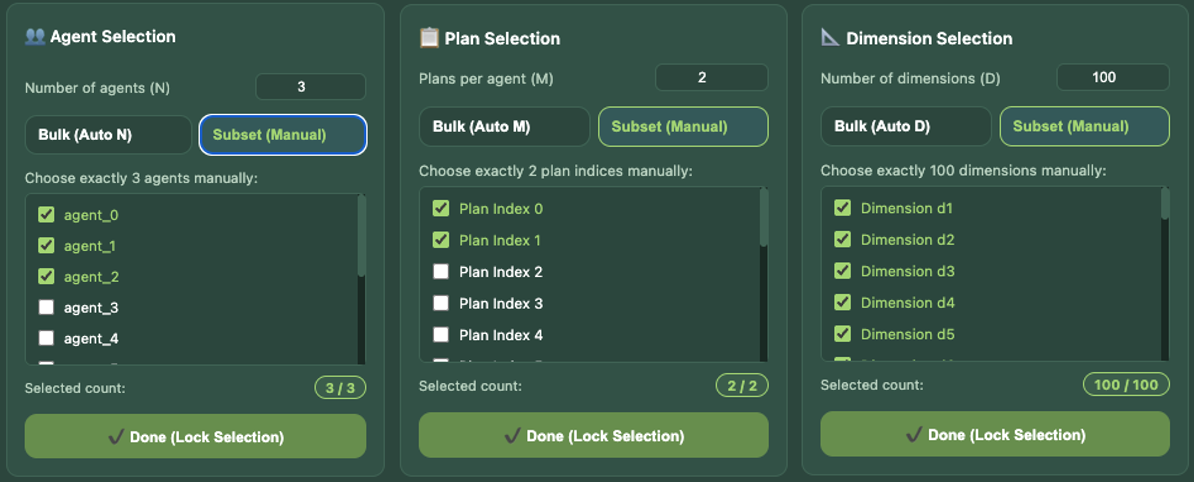
Manual subset mode exposes individual agent/plan/dimension checkboxes and validates the selected count.
Plan Editor
After agents, plans, and dimensions are locked, Argonaut displays a Plan Editor. It shows selected agents as tabs and displays plan rows with local cost and dimensions as editable numeric cells. The editor can be used to inspect or modify plan values before running an algorithm.
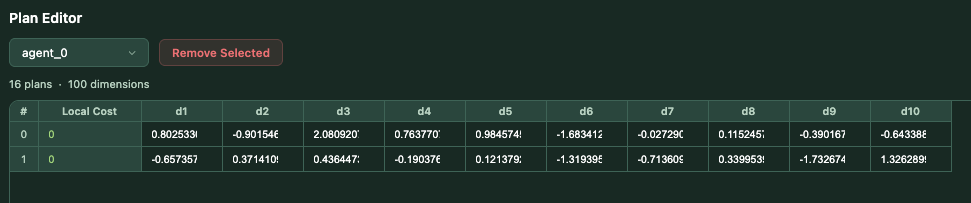
Plan editor shows and edits the plan value of each agent.
Algorithm Parameters
IterationsNumber of algorithm iterations for Tree-Based and combined modes. The tested run used
40.Children per nodeBranching factor for the tree topology.
2produces the binary tree layout used in the tested run.SimulationsNumber of repeated simulations. The tested run used
1.
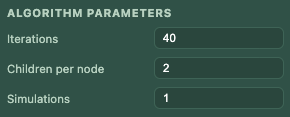
Set algorithm parameters.
Weighted Total Cost
Argonaut represents the total optimization cost as:
where:
and \(\alpha, \beta \geq 0\).
The tradeoff parameters \(\alpha\), \(\beta\), and \(\gamma\) steer the balance between fairness across agents, local discomfort, and global optimality. A higher weight expresses stronger preference toward minimizing that objective. When a weight is 0, the corresponding objective is not optimized.
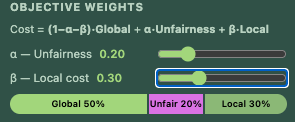
Tune weights on different objectives.
Cost Functions
Global cost functions
VAR - VarianceMinimizes variance in the global response. It is useful when the goal is to make the aggregate vector more uniform or flat.
RSS - Residual Sum of SquaresMeasures the residual between the global response and a goal signal. Lower values indicate a better match.
RMSE - Root Mean Square ErrorMeasures dissimilarity between the EPOS response and a scaled incentive signal.
XCORR - Cross-CorrelationMeasures shape matching through negative cross-correlation. Because EPOS is a minimization algorithm, it minimizes negative cross-correlation.
Local cost functions
INDEX - Plan indexUses the selected plan index as the local cost signal.
DISC - Discomfort scoreUses the plan score as discomfort.
PREF - PreferenceUses the plan score as preference.
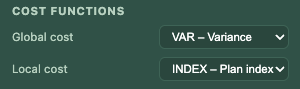
Choose cost functions in both global cost and local cost.